
Kia Forte: Limitations of the system / Vehicle recognition
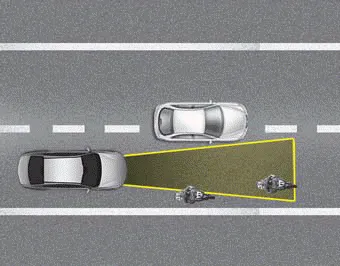
Some of the following vehicles ahead in your lane may not be recognized by the sensor:
- Narrow vehicles such as motorcycles
or bicycles
- Vehicles offset to one side
- Slow-moving vehicles or suddenly
decelerating vehicles
- Stopped vehicles
- Vehicles with small rear profiles
such as trailers with no loads
A vehicle ahead may not be recognized correctly by the sensor when any of the following occurs:
- When the vehicle is pointing
upwards due to overloading in the
trunk(tailgate)
- While making turns
- When driving to one side of the lane
- When driving on narrow lanes or on
curves
Adjust your vehicle speed by depressing the brake pedal according to the road and driving conditions ahead.
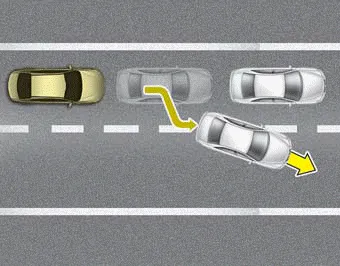
• When vehicles are at a standstill and the vehicle in front of you changes to the next lane, be careful when your vehicle starts to move because it may not immediately recognize the stopped vehicle in front of you.
In this situation you must maintain a safe braking distance, and if necessary, depress the brake pedal to reduce your driving speed in order to maintain a safe distance.
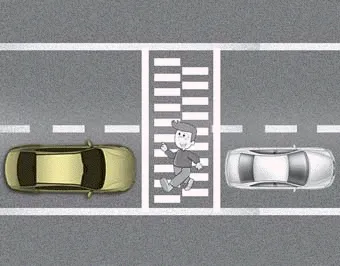
• Always look out for pedestrians when your vehicle is maintaining a distance with the vehicle ahead.
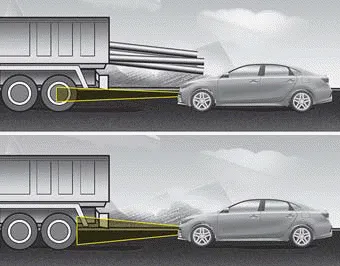
• Always be cautious when approaching vehicles that are taller with higher clearance, or vehicles carrying loads that stick out of the back of the vehicle.
WARNING - Inclines and towing
Do not use the smart cruise control system on steep inclines or when towing another vehicle or trailer since such extreme loading can interfere with your vehicle's ability to maintain the selected speed.
WARNING
When using the Smart Cruise Control, take the following precautions:
- If an emergency stop is necessary, you must apply the brakes. The smart cruise control system may not be able to completely stop the vehicle or avoid a collision in every situation.
- Keep a safe distance according to road conditions and vehicle speed. If the vehicle to vehicle distance is too close during high-speed driving, a serious collision may result.
- Always maintain sufficient braking distance and decelerate your vehicle by applying the brakes if necessary.
- The Smart Cruise Control system may not recognize a stopped vehicle, pedestrians or an oncoming vehicle. Always look ahead cautiously in order to react to unexpected and sudden situations.
- Vehicles moving in front of you making frequent lane changes may cause a delay in the system's reaction or may cause the system to react to a vehicle actually in an adjacent lane. Always drive cautiously in order to react to unexpected and sudden situations.
- Always be aware of the selected speed and vehicle to vehicle distance. The driver should not solely rely on the system but always pay attention to driving conditions and control vehicle speed.
- The Smart Cruise Control system may not recognize complex driving situations, so always pay attention to driving conditions and control your vehicle speed.
- For safe operation, carefully read and follow the instructions in this manual before use.
CAUTION
The smart cruise control system may not operate temporarily due to electrical interference.
✽ NOTICE
The Smart Cruise Control System may not operate properly due to:
- Electrical interference.
- Modifying the suspension.
- Differences of tire abrasion or tire pressure.
- Installing different type of tires.
On inclines During uphill or downhill driving, the smart cruise control system may not immediately detect a moving vehicle in your lane, and may cause your vehicle to accelerate to the set speed.
The drive mode may be selected according to the driver's preference or road condition. The mode changes whenever the DRIVE MODE button is pressed.
Other information:
Kia Forte 2019-2024 (BD) Owner's Manual: Introduction
With the Tire Mobility Kit (TMK) you stay mobile even after experiencing a tire puncture. The system compressor and sealing compound effectively seal most punctures in a passenger car tire caused by nails or similar objects and reinflates the tire.
Kia Forte 2019-2024 (BD) Owner's Manual: Notes on the safe use of the Tire Mobility Kit
Park your car at the side of the road so that you can work with the Tire Mobility Kit away from moving traffic. To be sure your vehicle will not move, even when you're on fairly level ground, always set your parking brake. Only use the Tire Mobility Kit for sealing/inflation passenger car tires.
Categories
- Manuals Home
- Kia Forte Owners Manual
- Blade replacement
- Drive mode integrated control system
- Maintenance
- New on site
- Most important about car
