
Kia Forte: LKA operation / LKA activation
- To see the LKA screen on the LCD
display in the cluster, Tab to the
ASSIST mode (
 ).
). - For further details, refer to the [menu settings] section in Chapter 4.
- After LKA is activated, if both lane markers are detected, vehicle speed is over 64 km/h (40 mph) and all the activation conditions are satisfied, a green steering wheel indicator will illuminate, and the steering wheel will be controlled.
WARNING
The Lane Keeping Assist system is a system to help prevent the driver from leaving the lane. However, the driver should not rely solely on the system and should always check the road conditions while driving.
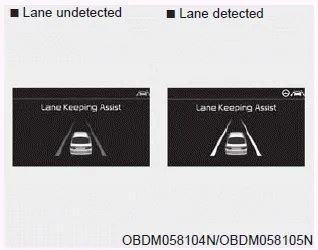
If the speed of the vehicle is over 64 km/h (40 mph) and the system detects lane markers, the color changes from gray to white
When the conditions below are met, LKA will be enabled to assist steering.
- Vehicle speed is above 64 km/h (40 mph).
- Both lane markers are detected by LKA.
- The vehicle is between the lane markers.
If LKA can assist steering, a green steering wheel indicator will illuminate.
To activate/deactivate the LKA: With the ignition switch in the ON position, press the LKA button located on the instrument panel on the lower left hand side of the driver.
If the vehicle leaves a lane, the lane marker you cross will blink on the LCD display. If the vehicle moves out of its lane because the steering torque for assistance is insufficient, the line indicator will blink.
Other information:
Kia Forte 2019-2024 (BD) Owner's Manual: Components of the Tire Mobility Kit (TMK)
1. Speed restriction label 2. Sealant bottle and label with speed restriction 3. Filling sealant and air hose from sealant bottle to wheel 4. Connectors and cable for the power outlet direct connection 5. Holder for the sealant bottle 6.
Kia Forte 2019-2024 (BD) Owner's Manual: Specifications & Consumer information
Dimensions Engine Bulb wattage Tires and wheels CAUTION When replacing tires, use the same size originally supplied with the vehicle. Using tires of a different size can damage the related parts or make them work irregularly. ✽ NOTICE It is permissible to add 21 kPa (3 psi) to the standard tire pressure specificatio
Categories
- Manuals Home
- Kia Forte Owners Manual
- Check tire pressure
- Features of your vehicle
- Owner maintenance
- New on site
- Most important about car
