
Kia Forte: Lane Keeping Assist (LKA) system / LKA operation
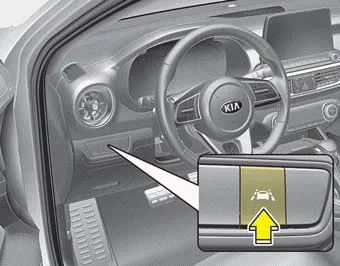
To activate/deactivate the LKA:
With the ignition switch in the ON position, press the LKA button located on the instrument panel on the lower left hand side of the driver.
The indicator in the cluster display will initially illuminate white.
When the indicator(white) activated in the previous ignition cycle, the system turns on without any control.
If you press the LKA button again, the indicator on the cluster display will go off.
The color of the indicator will change depend on the condition of LKA.
- White : Sensor does not detect
the lane marker or vehicle
speed is less than 64
km/h (40 mph).
- Green : Sensor detects the lane
marker and system is able
to control the steering.
The Lane Keeping Assist system is designed to detect the lane markers on the road with a front view camera at the front windshield, and assists the driver’s steering to help keep the vehicle in the lanes.
To see the LKA screen on the LCD display in the cluster, Tab to the ASSIST mode ( ). For further details, refer to the [menu settings] section in Chapter 4.
Other information:
Kia Forte 2019-2024 (BD) Owner's Manual: Emergency towing
■ Front ■ Rear If towing is necessary, we recommend you to have it done by an authorized Kia dealer or a commercial tow truck service. If towing service is not available in an emergency, your vehicle may be temporarily towed using a cable or chain secured to the emergency towing hook under the front (or rear) of the veh
Kia Forte 2019-2024 (BD) Owner's Manual: Trunk room lamp replacement
1. Open the trunk lid. 2. Remove the lamp assembly by using a flat-blade screwdriver. 3. Remove the cover from the lamp assembly. 4. Remove the bulb by pulling it straight out. 5. Install a new bulb in the socket. 6. Install the cover to the lamp assembly.
Categories
- Manuals Home
- Kia Forte Owners Manual
- Features of your vehicle
- Drive mode integrated control system
- Your vehicle at a glance
- New on site
- Most important about car
