
Kia Forte: Smart Cruise Control / Smart Cruise Control speed
To set Smart Cruise Control Speed :
1. Press the CRUISE button to turn the system on. The CRUISE indicator in the instrument cluster will illuminate.
2. Accelerate to the desired speed.
The smart cruise control speed can be set as follows:
• 30 km/h (20 mph) ~ 180 km/h (110 mph)
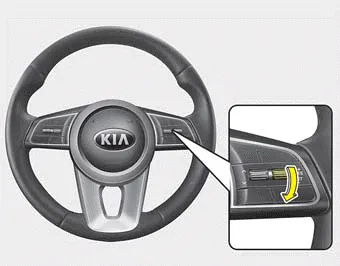
3. Move the lever down (to SET-), and release it at the desired speed. The set speed and vehicle to vehicle distance on the LCD screen will illuminate.
4. Release the accelerator pedal. The desired speed will automatically be maintained.
If there is a vehicle in front of you, the speed may decrease to maintain the distance to the vehicle ahead.
On a steep grade, the vehicle may slow down or speed up slightly while going uphill or downhill.
Vehicle speed may decrease on an upward slope and increase on a ownward slope.
The speed will be set to 30 km/h (20 mph) when there is a vehicle ahead and your vehicle speed is 10 km/h (6 mph) ~ 30 km/h (20 mph).
- To increase cruise control set speed
- To decrease the cruise control set speed
- Smart cruise control will be temporarily canceled when
- To resume cruise control set speed
- To turn cruise control off
CANCEL : Cancels cruise control operation. CRUISE : Turns cruise control system on or off. RES + : Resumes or increases cruise control speed.
Follow either of these procedures: Move the lever up (to RES+), and hold it. Your vehicle set speed will increase by 10 km/h (5 mph). Release the lever at the speed you want.
Other information:
Kia Forte 2019-2024 (BD) Owner's Manual: Notes on the safe use of the Tire Mobility Kit
Park your car at the side of the road so that you can work with the Tire Mobility Kit away from moving traffic. To be sure your vehicle will not move, even when you're on fairly level ground, always set your parking brake. Only use the Tire Mobility Kit for sealing/inflation passenger car tires.
Kia Forte 2019-2024 (BD) Owner's Manual: Technical Data
- For 15/16 inch tire System voltage: DC 12 V Working voltage: DC 10 - 15 V Amperage rating: MAX. 10 ± 1 A (at DC 12V operation) Suitable for use at temperatures: -30 ~ +70°C (-22 ~ +158°F) Max. working pressure: 6 bar (87 psi) Size Compressor: 161 x 150 x 55.
Categories
- Manuals Home
- Kia Forte Owners Manual
- Normal Maintenance Schedule - Non Turbo Models
- Engine coolant
- Maintenance
- New on site
- Most important about car
