Kia Forte: Vehicle to vehicle distance setting / Warning message
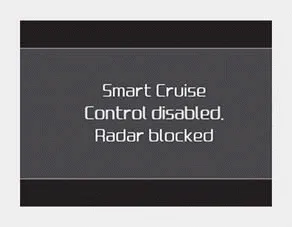
■ Type A
■ Type B
When the sensor lens cover is blocked with dirt, snow, or debris, the Smart Cruise Control System operation may stop temporarily. If this occurs, a warning message will appear on the LCD display. Remove any dirt, snow, or debris and clean the radar sensor lens cover before operating the Smart Cruise Control System. The Smart Cruise Control system may not properly activate, if the radar is totally contaminated, or if any object or vehicle is not detected after turning ON the engine (e.g. in an open terrain).
The sensor detects the distance to the vehicle ahead. If the sensor is covered with dirt or other foreign matter, the vehicle to vehicle distance control may not operate correctly.
■ Type A ■ Type B The message will appear when the vehicle to vehicle distance control system is not functioning normally. In this situation, take your vehicle to an authorized Kia dealer and have the system checked.
Other information:
Kia Forte 2019-2024 (BD) Owner's Manual: Engine compartment fuse panel
Engine room compartment fuse panel Engine room compartment fuse panel Relay Engine compartment fuse panel (Battery terminal cover) ✽ NOTICE Not all fuse panel descriptions in this manual may be applicable to your vehicle.
Kia Forte 2019-2024 (BD) Owner's Manual: Room lamp (Bulb type) bulb replacement
WARNING Prior to working on the Interior lamps, ensure that the “OFF” button is depressed to avoid burning your fingers or receiving an electric shock. 1. Using a flat-blade screwdriver, gently pry the lens cover from lamp housing.
Categories
- Manuals Home
- Kia Forte Owners Manual
- Safety features of your vehicle
- Maintenance
- Normal Maintenance Schedule - Turbo Models
- New on site
- Most important about car
