
Kia Forte: Forward Collision-avoidance Assist (FCA) / FCA front view camera sensor
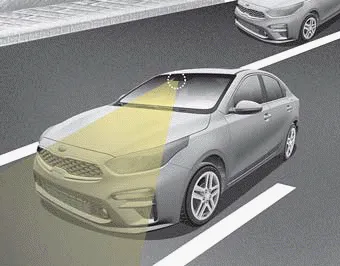
The sensor is designed to maintain a certain distance from the front end of the vehicle.
However, a sensor covered or dirty with foreign substances, such as dirt or snow, adversely affects the sensing performance. It may even temporarily cancel the FCA. Always keep the sensor and its external parts clean.
Warning message and warning light
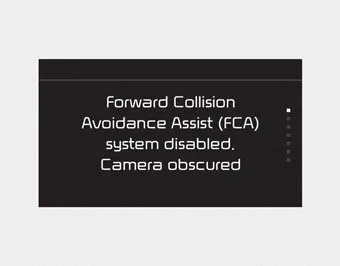
When the sensor is covered or the sensor lens is dirty with foreign substances, such as snow or rain, the FCA system may not be able to detect vehicles. In this situation, a warning message ("Forward Collision-Avoidance Assist (FCA) system disabled. Camera blocked") will appear to notify the driver. Remove the foreign substances to allow the FCA system to function property.
This is not a malfunction with the FCA. To operate the FCA again, remove the foreign substances.
The FCA may not properly operate in an area (e.g. open terrain), where vehicles or objects are not detected after turning ON the engine.
✽ NOTICE
- Always keep the sensor clean and free of dirt and debris.
- Be careful not to apply unnecessary force on the sensor. If the sensor is forcibly moved out of proper alignment, the FCA system may not operate correctly. In this situation, a warning message may not be displayed. In this situation, have the vehicle inspected by an authorized Kia dealer.
- Use only genuine parts to repair or replace a damaged
- Do not tint the window or install stickers, accessories around the inside mirror where the camera is installed.
- Make sure the frontal camera installation point does not get wet.
- Do not impact or remove any camera components.
- Do not place reflective objects(white paper or mirror etc.) on the dashboard. The system may unnecessarily activate or deactivate due to reflection of the sunlight.
- Excessive audio system volume may prevent occupants from hearing the FCA system warning alarm.
In an emergency situation, the braking system enters in ready status for prompt reaction upon the driver depressing the brake pedal. The FCA system provides additional braking power for optimum braking performance when the driver depresses the brake pedal.
When the FCA is not working properly, the FCA warning light ( ) will illuminate and the warning message will appear for a few seconds. After the message disappears, the master warning light ( ) will illuminate.
Other information:
Kia Forte 2019-2024 (BD) Owner's Manual: Using the Tire Mobility Kit
1. Detach the speed restriction label (1) from the sealant bottle (2), and place it in a highly visible place inside the vehicle such as on the steering wheel to remind the driver not to drive too fast. 2. Filling the sealant: Strictly follow the specified sequence, otherwise the sealant may escape under high pressure.
Kia Forte 2019-2024 (BD) Owner's Manual: Side marker bulb replacement (Headlamp Type A,B)
1. Open the hood. 2. Remove the bulb-socket from the headlamp assembly by turning the bulb-socket counterclockwise until the tabs on the bulb-socket align with the slots on the headlamp assembly. 3. Remove the bulb from the bulbsocket by pulling it out.
Categories
- Manuals Home
- Kia Forte Owners Manual
- Safety features of your vehicle
- Drive mode integrated control system
- Folding the rear seat
- New on site
- Most important about car
