
Kia Forte: Trip information (Trip computer) / Distance to empty
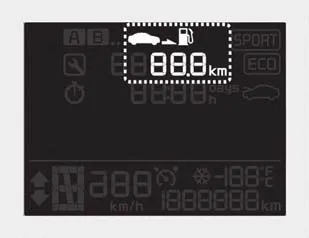
■ Type A
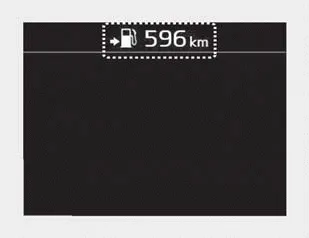
■ Type B
• The distance to empty is the estimated distance the vehicle can be driven with the remaining fuel.
- Distance range: 1 ~ 9,9999 km or 1 ~ 9,999 mi.
• If the estimated distance is below 1 km (1 mi.), the trip computer will display “---” as distance to empty.
✽ NOTICE
- If the vehicle is not on level ground or the battery power has been interrupted, the distance to empty function may not operate correctly.
- The distance to empty may differ from the actual driving distance as it is an estimate of the available driving distance.
- The trip computer may not register additional fuel if less than 6 liters (1.6 gallons) of fuel are added to the vehicle.
- The fuel economy and distance to empty may vary significantly based on driving conditions, driving habits, and condition of the vehicle.
The trip computer is a microcomputer- controlled driver information system that displays information related to driving. ✽ NOTICE Some driving information stored in the trip computer (for example Average Fuel Economy) resets if the battery is disconnected.
- For type A cluster To change the trip mode, press the TRIP button. - For type B, C cluster To change the trip mode, scroll the MOVE scroll switch ( / ) or press the TRIP button in the trip computer mode.
Other information:
Kia Forte 2019-2024 (BD) Owner's Manual: Maintenance services
You should exercise the utmost care to prevent damage to your vehicle and injury to yourself whenever performing any maintenance or inspection procedures. Should you have any doubts concerning the inspection or servicing of your vehicle, we strongly recommend that you have an authorized Kia dealer perform this work.
Kia Forte 2019-2024 (BD) Owner's Manual: Trunk room lamp replacement
1. Open the trunk lid. 2. Remove the lamp assembly by using a flat-blade screwdriver. 3. Remove the cover from the lamp assembly. 4. Remove the bulb by pulling it straight out. 5. Install a new bulb in the socket. 6. Install the cover to the lamp assembly.
Categories
- Manuals Home
- Kia Forte Owners Manual
- Normal Maintenance Schedule - Turbo Models
- Sensor to detect the distance from the vehicle in front (front radar/camera)
- Safety features of your vehicle
- New on site
- Most important about car
